
• Supports every OT system OS from the XP era to the present
    Acronis Cyber Protect provides backup and recovery even for OT systems running older versions of Windows and Linux that other data protection vendors have abandoned.
  • Protects OT systems even in air-gapped environments
    Acronis keeps OT systems up and running even in manufacturing and industrial environments that have no external network connections for security purposes.
  • Enables local recovery of OT systems without IT intervention
    Acronis One-Click Recovery enables workers with no IT skills to restore failed OT systems in minutes with a few clicks, without the need for IT staff intervention.
  • Strengthens regulatory compliance for OT systems
    Acronis Cyber Protect helps automation vendors and manufacturers meet stringent local and industry-specific regulations by providing secure, compliant backup and recovery.
 
Failed OT systems can be replicated to new hardware if necessary via Acronis Universal Restore, enabling fast recovery after a PC hardware failure, e.g., dead hard drive or motherboard.
Protection for all OT systems from the XP era to the present

Unique, ongoing support for legacy Windows and Linux versions that other data protection vendors have abandoned.

 
  • Protects the PCs that run OT applications, preventing their failure from causing costly halts in real-time production
  • Maintains the stability of OT environments with backup and recovery even for the oldest legacy OSs
  • Enables backup operations without the need for scheduled OT system downtime (including initial installation)

 

Local workers can recover OT systems without IT help and reduce system outages from hours to minutes

Acronis

Acronis One-Click Recovery enables local workers regardless of their IT skill level to recover failed OT systems — even in environments that are remote, unstaffed by IT and/or air-gapped for security reasons.

Acronis

Acronis One-Click Recovery reduces production outages due to OT system failures from hours or days to a matter of minutes without the need for direct IT intervention.

Industry-best coverage of various OSs and hypervisors:

Windows

  • Windows Server 2003 SP1, R2 and later, 2008/2008 R2,
  • 2012/2012 R2, 2016, 2019, 2022 except Nano
  • Windows Small Business Server 2003/2003 R2, 2008, 2011
  • Windows Home Server 2011
  • Windows MultiPoint Server 2010, 2011, 2012
  • Windows Storage Server 2003, 2008/2008 R2, 2012/2012 R2, 2016
  • Windows XP Professional SP1, SP2, SP3
  • Windows 7, 8/8.1, 10 (except RT), 11 (all editions)

Microsoft SQL Server

  • 2022, 2019, 2017, 2016, 2014, 2012, 2008/RT, 2005

MacOS

  • OS X Mavericks 10.9, Yosemite 10.10, El Capitan 10.11
  • macOS Sierra 10.12, High Sierra 10.13, Mojave 10.14, Catalina 10.15, Big Sur 11, Monterey 12, Ventura 13, Sonoma 14

Hypervisors

  • VMware vSphere 4.1, 5.0, 5.1, 5.5, 6.0, 6.5, 6.7, 7.0, 8.0
  • Microsoft Hyper-V Server 2022, 2019, 2016, 2012/2012 R2, 2008/2008 R2
  • Citrix XenServer/Citrix Hypervisor 8.2 – 4.1.5
  • Linux KVM 8 – 7.6
  • Scale Computing Hypercore 8.8, 8.9, 9.0
  • Red Hat Enterprise Virtualization (RHEV) 3.6-2.2
  • Red Hat Virtualization 4.0, 4.1, 4.2, 4.3, 4.4
  • Virtuozzo 7.0.14 – 6.0.10
  • Virtuozzo Infrastructure Platform 3.5
  • Nutanix Acropolis Hypervisor (AHV) 20160925.x through 20180425.x

Linux

  • Kernel 2.6.9 to 5.19
  • RHEL 4.x, 5.x, 6.x, 7.x, 8.x*, 9.0*, 9.1*, 9.2*, 9.3*
  • Ubuntu 9.10 – 23.04
  • Fedora 11 – 31
  • SUSE Linux Enterprise Server 10, 11, 12, 15
  • Debian 4.x, 5.x, 6.x, 7.0, 7.2, 7.4-7.7, 8.0-8.8, 8.11, 9.0- 9.8, 10.x, 11.x
  • CentOS 5.x, 6.x, 7.x, 8.x*
  • Stream 8*,9*
  • Oracle Linux 5.x, 6.x, 7.x, 8.x*, 9.0*, 9.1*, 9.2*, 9.3*
  • CloudLinux 5.x, 6.x, 7.x, 8.x*
  • ClearOS 5.x, 6.x, 7.x
  • AlmaLinux 8.x*, 9.0*, 9.1*, 9.2*, 9.3*
  • Rocky Linux 8.x*, 9.0*, 9.1*, 9.2*, 9.3*
  • ALT Linux 7.0

Protect for Operational Technology (OT)

  • Integrated cybersecurity and data protection

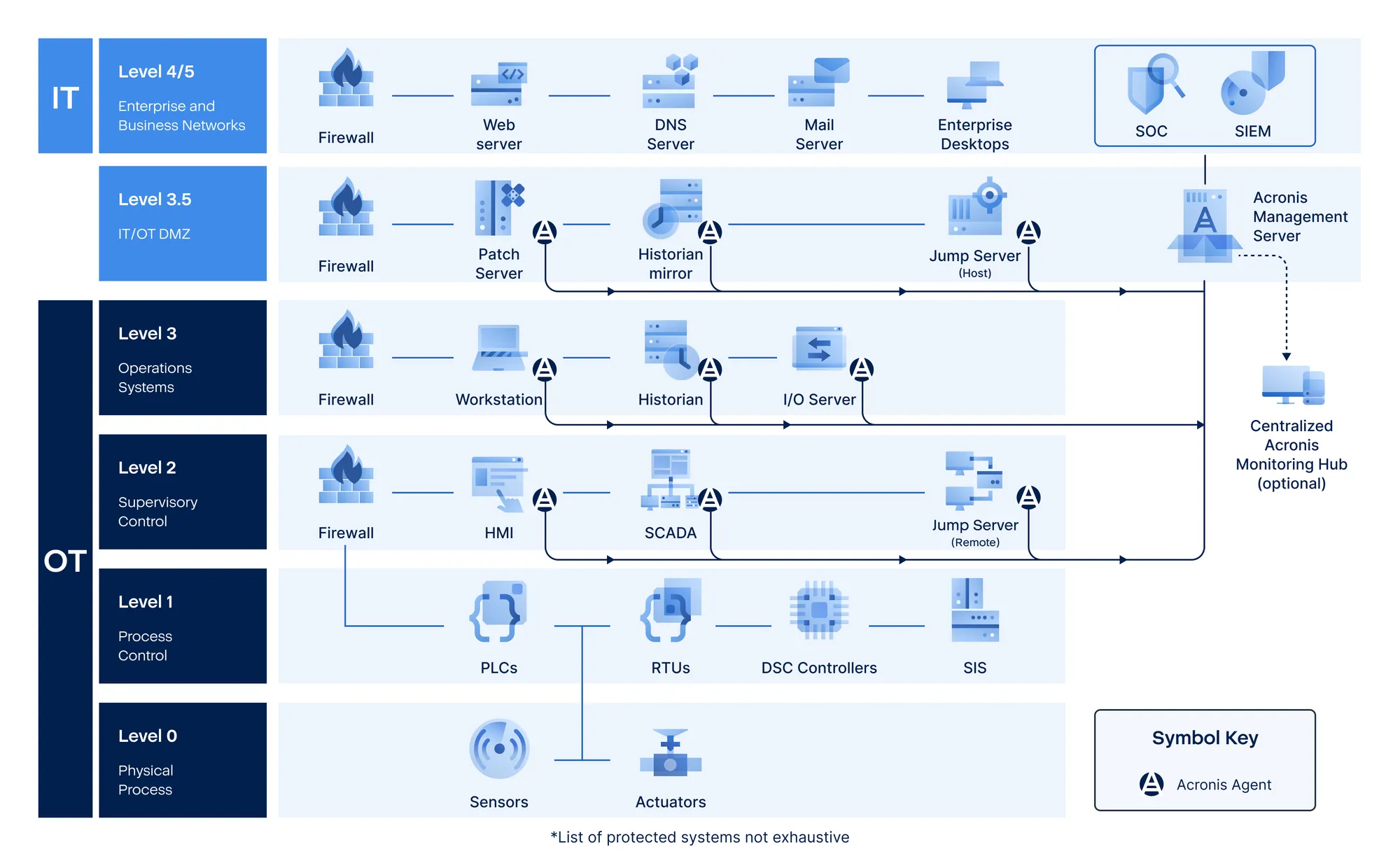
    The same agent that provides OT system backup and restoral protection can also deliver a range of cybersecurity features, including Active Protection against ransomware, antivirus and anti-malware, hard disk drive health monitoring and EDR. OT system backups can be scanned for malware and vulnerabilities and can remediate both prior to restoral operations.

Protection of front-office and back-office systems

Acronis Cyber Protect can also protect workstations and applications outside of the OT environment, including back-office systems (ERP, supply chain management, procurement, production planning, quality control, maintenance, finance, accounting, HR and IT) and front-office systems (sales, marketing, customer service and PR).

Additional cloud-based protections

In addition to the Acronis Management Server deployed on-premises to protect the OT environment, additional Acronis Management Servers can be deployed in the cloud to enable Disaster Recovery services, to protect cloud-based application suites like Microsoft 365 and Google Workspace, and to use the Acronis Cloud for secure, off-site storage of backups.
 

Centralized dashboard

Metadata on OT systems can be streamed from the Acronis Management Server to a centralized data warehouse, monitored by an Acronis Monitoring Hub and processed by third-party monitoring, reporting and analytical tools.

Advanced management and forensics

Acronis Cyber Protect can be used for vulnerability assessment, patch management, and hardware / software inventory on OT systems. Forensic data stored in OT system backups can be used in post-incident investigations for incident response improvement and compliance purposes.
 

Flexible backup storage

Acronis Cyber Protect backups of OT systems can be archived on wide variety of storage options, including local storage, NAS, SANs, and public and private clouds, including the Acronis Cloud.

ขอรับข้อมูลเพิ่มเติม

Error: Contact form not found.